Where Espresso Serial Number Information Is Published
Five espresso manufacturers were checked for a published serial number format, location or lookup. One publishes all three. The other four publish nothing readable.
Of five espresso manufacturers checked, one publishes a serial number format, location and lookup: De’Longhi. The other four publish nothing on the subject that could be read.
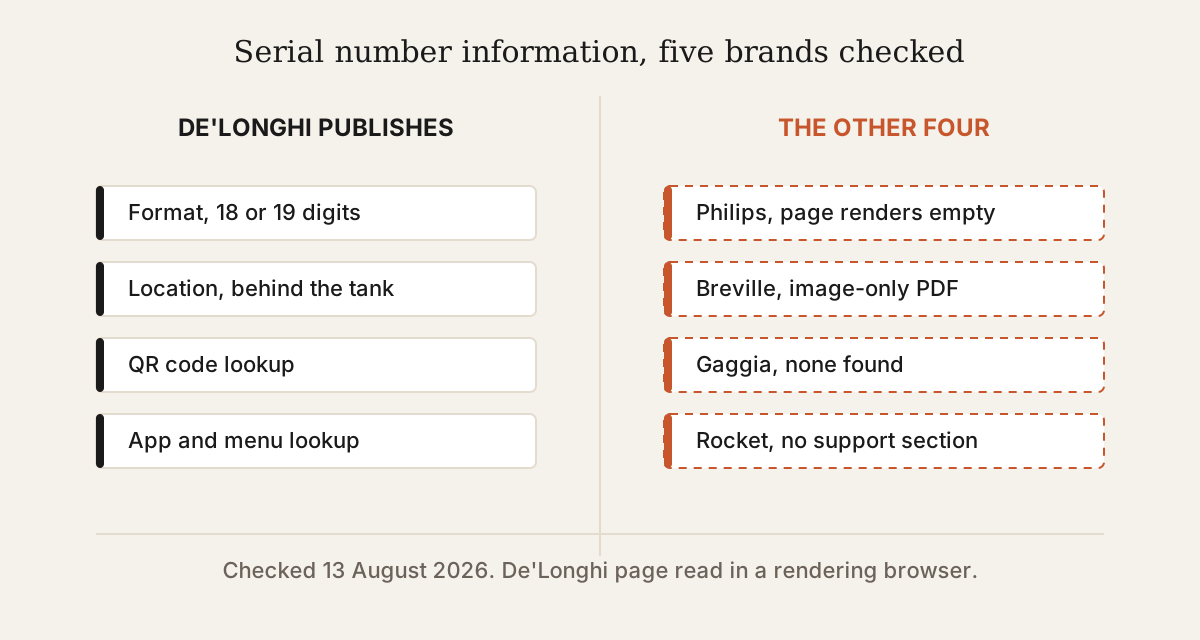
The counting rule, and the five brands
A brand counts as publishing this when a manufacturer-hosted page or document, reachable without a login, states where the serial number is, what format it takes, or how to look it up. Retailer pages, forums and third-party help centres do not count. Checked 13 August 2026.
The five: Philips, Gaggia, Breville, De’Longhi and Rocket Espresso. Rancilio was checked and excluded from the five because its technical portal requires a User ID and password.
What De’Longhi publishes
A page titled Where to find your machine's serial number, at delonghi.com/en-us/e/find-serial-number, with a separate entry per product category.
For automatic coffee machines it states, verbatim:
Your serial number is an alpha-numeric 18 or 19-digit code that can be found behind the water tank (you can scan the QR code or check the printed number). If you own a connected coffee maker, you can also find your serial number into menu settings or in your Coffee Link APP.
For manual espresso machines it states, verbatim:
Your serial number is an alpha-numeric 18-digit code that can be found at the back of your machine, behind the water tank (you can scan the QR code or check the printed number).
That is a published format, a published location and three published lookup routes. Read in a rendering browser on 13 August 2026, because the page builds its content in JavaScript and its static source carries none of the text above.
The four that do not
One brand serves an empty page, one serves an unreadable file, and two publish nothing on the subject at all.
| Brand | What was found |
|---|---|
| Philips | A URL exists whose slug describes exactly this content. It returns HTTP 200 and renders an empty page, header and footer only, with the document title undefined | undefined |
| Breville | Its warranty PDF is served from breville.com and is image-only, yielding zero extractable text. Whether it carries serial guidance is not established |
| Gaggia | gaggia-na.com/pages/support returns 200 and carries a technical support contact form. No serial format, location or lookup was found on it |
| Rocket Espresso | /support, /serial-number, /warranty, /registration and /product-registration all return 404. The domain has no support section |
Breville’s status is not established rather than no, and the difference matters. The document is hosted by Breville and could not be read, which is not the same as a document that does not exist.
The trap in the Philips result
A page can return HTTP 200 and contain nothing.
The Philips URL is usa.philips.com/c-f/XC000007391/where-to-find-the-type-and-serial-number-of-my-philips-saeco-espresso-machine. The status code is 200. The slug is descriptive. Search results describe its former contents. Rendered in a browser, the page is empty.
This is the same failure mode recorded elsewhere on this site for De’Longhi’s document server, where guessed document IDs return HTTP 200 with a 6,657 byte placeholder rather than a 404. In both cases a status code is not evidence that a page has content, and the only reliable test is to read what is served.
Why the model code is the more useful identifier
Every one of the five publishes model codes, and one publishes serial number information.
A model code identifies which machine a document describes. A serial number identifies an individual unit, which matters for warranty and service and is answered by the manufacturer rather than by a specification. The documents inventoried on this site describe models, not units, which is why model code coverage is broad here and serial coverage is one brand deep.